AI Acceptable Use Policy Template + Examples (2026)
AI Acceptable Use Policy (AUP) Template
Many teams adopt AI tools before they have clear rules for confidential data, approved tools, security, quality control, and cost management. This page gives you a practical AI Acceptable Use Policy (AUP) you can tailor in a short amount of time. Plus a rollout guide so it actually works in real life.
Disclaimer: This template is for informational purposes and isn't legal advice.
What you’ll get on this page
A 1-page AI Acceptable Use Policy (AUP) you can publish internally today
A detailed AUP that stands up better to audits, vendor reviews, and day-to-day enforcement
A step-by-step implementation checklist (owners, training, approvals, incident reporting)
Clear answers to common questions (personal accounts, sensitive data, review cadence)
What is an AI Acceptable Use Policy (AUP)?
An AI Acceptable Use Policy is a set of day-to-day rules that defines what employees can and can’t do with AI tools at work. AUPs typically cover:
Which AI tools are approved (and how people must access them, e.g., company accounts/SSO)
What data can be entered (public info vs. confidential data vs. customer PII)
How outputs must be reviewed (accuracy checks, citations, human approval for sensitive uses)
How to report incidents (suspected exposure, policy violations, prompt injection)
An “AI policy” can be broader (governance, ethics, roles). An AUP is the practical subset that guides everyday use.
When do you need an AUP?
You should consider publishing an AUP if any of the following are true:
Employees use AI for writing, summarizing, research, or coding
People are pasting in internal docs, customer emails, contracts, or meeting notes
Your team is creating AI-generated content for marketing, sales, or customer support
You want visibility into usage and costs (and to prevent “shadow AI” accounts)
How to use this template (5 minutes)
Replace all bracketed fields like [Company Name].
Delete any sections you don't need
Review with Security/IT, Legal, HR, and a business owner
Publish it internally and add it to onboarding.
How to implement your AUP (so it actually works)
Copy/pasting a policy is easy. Rolling it out and keeping it current is what prevents problems later. Here’s a pragmatic process that works for mixed teams (Security/IT, Legal, HR, Finance, Operations, Product, Marketing).
Step 1: Choose an owner and approval path
Assign a policy owner (often Security/IT).
Define who must approve exceptions (often Legal/Security for sensitive data).
Create a single place employees can ask questions (e.g., #ai-help or a shared inbox).
Why this matters: if people don’t know who to ask, they’ll guess—or avoid the policy.
Step 2: Maintain an “approved AI tools” list
Decide:
Which tools are allowed for work
Whether SSO/company accounts are required
Which models/features are restricted (e.g., higher-cost models, plugins/extensions)
Tip: keep the approved list next to the policy so it doesn’t drift.
Step 3: Define data rules people can remember
Most AUP violations happen because employees aren’t sure what they can paste into an AI tool.
Use three buckets:
Never allowed (secrets, credentials, payment details)
Allowed only with approval (customer PII, non-public contracts, security details)
Generally allowed (public info, anonymized text, generic drafts)
Step 4: Set output rules and quality control
Make it clear that AI output is a draft unless reviewed. Decide when you require:
Human review
Citations/sources
Second-person approval (e.g., Legal for external claims)
Step 5: Train (briefly) and repeat
A 15-minute training is usually enough if it includes:
3 examples of “OK to paste”
3 examples of “never paste”
What to do when unsure (ask channel + escalation)
Step 6: Add incident reporting and monitoring
Define:
Who gets notified if there’s suspected exposure or policy violation
What information to include in a report (tool used, data type, time, user, screenshots/logs)
Step 7: Review the policy on a schedule
Set a cadence (often quarterly) and update when:
New tools/models are introduced
Pricing or vendor terms change
Regulations or customer requirements change
Common mistakes (and how to avoid them)
Making the policy too strict → people ignore it Fix: allow safe defaults + a clear approval process.
Allowing personal AI accounts for work → lower visibility and inconsistent controls Fix: use company-managed accounts/SSO where possible.
No approved tools list → “policy” becomes unenforceable Fix: keep a maintained list with an owner.
No ownership / no review date → policy goes stale Fix: assign an owner and add a review schedule.
1) AI Acceptable Use Policy (AUP) — Quick-start (1 page)
AI Acceptable Use Policy (AUP) — Quick Start
Copy/paste, then replace anything in brackets like [Company Name].
AI ACCEPTABLE USE POLICY (AUP) — QUICK START

Company: [Company Name]
Effective date: [YYYY-MM-DD]
Policy owner: [Team / Role]
Applies to: All employees, contractors, interns, and temporary staff
Review cycle: [Quarterly / Semiannual]

1) Purpose
This policy defines acceptable use of AI tools to improve productivity while protecting Company data, customers, and intellectual property.

2) Approved AI tools
Use only AI tools approved by [IT/Security]. Approved tools list: [Link / List].
Do not use personal AI accounts for Company work unless explicitly approved.

3) Data rules (most important)
Do NOT enter into any AI tool:
- Passwords, secrets, API keys, private keys, access tokens
- Payment data (credit card/bank), authentication codes
- Customer personal data (PII) unless approved by [Legal/Security]
- Confidential contracts, legal documents, non-public financials unless approved
- Proprietary source code or architecture details unless approved

Allowed inputs (examples):
- Public information
- Sanitized/anonymized text with no identifiers
- General drafts that contain no confidential details

4) Output rules
- Treat AI output as a draft: verify facts, sources, calculations, and claims.
- Do not publish AI-generated content externally without human review.
- Do not rely on AI as the sole basis for legal/medical/financial decisions.

5) Intellectual property (IP)
Do not paste third-party copyrighted content into AI tools unless permitted.
Follow [Company IP/Attribution rules] for AI-assisted deliverables.

6) Security & integrations
- Use SSO (single sign-on) where available.
- Do not connect AI tools to Company drives/knowledge bases without approval.
- Report suspected data exposure immediately to [Security Contact].

7) Logging, monitoring & costs
AI usage may be logged for security, compliance, and cost management.
Employees must follow usage limits/budgets set by [Owner].

8) Violations
Violations may result in restricted access and disciplinary action up to termination.

Approval
[Name, Title]
[Date]
Tip: Add an owner + review date so the policy doesn’t go stale.
2) Full AI Acceptable Use Policy Template (detailed)
Use this version if you want a policy that stands up better to audits, vendor reviews, and day-to-day enforcement.
AI Acceptable Use Policy (AUP)
Copy/paste, then replace anything in brackets like [Company Name].
AI ACCEPTABLE USE POLICY (AUP)

Document control
- Company: [Company Name]
- Version: [1.0]
- Effective date: [YYYY-MM-DD]
- Owner: [Role / Team]
- Approved by: [Role]
- Review cycle: [Quarterly / Semiannual]

1. Purpose
1.1 Purpose
[Company Name] ("Company") enables employees to use artificial intelligence ("AI") tools to improve productivity while protecting Company data, customers, and intellectual property.

1.2 Goals
This policy aims to:
(a) protect Company, customer, and partner data,
(b) reduce legal and compliance risk,
(c) ensure high-quality outputs and responsible use,
(d) manage and control costs.

2. Scope
2.1 Covered persons
This policy applies to all employees, contractors, interns, and temporary staff.

2.2 Covered systems and data
This policy covers any AI usage involving Company systems, accounts, networks, or data, including third-party AI tools used for Company work.

3. Definitions
3.1 AI Tool
Any system that generates or transforms text, images, audio, video, or code using machine learning.

3.2 Confidential Data
Any non-public information relating to the Company, its customers, partners, or employees, including business, financial, legal, technical, or security information.

3.3 Personal Data (PII)
Information that can identify an individual directly or indirectly (e.g., name, email, phone, ID number).

4. Principles
4.1 Human accountability
Humans remain accountable for decisions and deliverables. AI does not replace professional judgment.

4.2 Least privilege
AI tools and integrations must be granted only the minimum access necessary.

4.3 Data minimization
Only provide the minimum data needed to accomplish the task.

4.4 Security by design
Use approved tools and secure configurations (SSO, encryption, access controls).

5. Approved tools and accounts

5.1 Approved tool list
Employees may use only tools approved by [IT/Security] and listed at: [Link].

5.2 Account requirements
- Use Company-managed accounts (SSO) where available.
- Do not use personal AI accounts for Company work unless approved by [IT/Security].

5.3 Tool requests
Requests for new AI tools must be submitted via [Process/Link] and will be evaluated for:
- security controls (SSO, RBAC, encryption)
- data handling/retention policies
- compliance (DPA, SOC 2 or equivalent)
- cost impact

6. Data handling rules
6.1 Prohibited inputs (never allowed)
Employees must not enter any of the following into an AI tool:
- Passwords, credentials, secrets, access tokens, private keys
- Payment card or bank account information
- Authentication codes (OTP), recovery codes
- Highly sensitive personal data (health, biometrics, etc.)

6.2 Restricted inputs (allowed only with approval)
The following may be used only with documented approval from [Legal/Security] and only with appropriate safeguards:
- Customer PII or customer content
- Non-public legal documents, contracts, or negotiations
- Non-public financial results or forecasts
- Proprietary code, system architecture, or security details

6.3 Allowed inputs
The following inputs are generally allowed:
- Public information
- Sanitized/anonymized text that cannot identify a person or customer
- General drafts that do not include confidential business details

6.4 Anonymization requirements
When using internal text, employees must remove or mask:
- names, emails, phone numbers, addresses
- customer identifiers and account numbers
- unique project names or confidential identifiers

6.5 Storage and retention
Employees must assume that content entered into third-party AI tools may be stored and reviewed by the provider unless a signed agreement states otherwise.

7. Output usage and quality controls
7.1 Verification
AI outputs must be verified for:
- factual accuracy
- citations/sources for claims
- calculations and reasoning
- compliance with Company standards

7.2 External publication
No AI-generated content may be published externally (marketing, documentation, code, customer communications, etc.) without human review.

7.3 Sensitive decisions
AI must not be used as the sole basis for legal, medical, HR, compliance, hiring, or financial decisions.

8. Intellectual property and licensing
8.1 Third-party materials
Employees must not input third-party copyrighted material unless permitted by license or explicit permission.

8.2 Company IP
AI-assisted work products are Company deliverables and must comply with [IP policy]. Where required, include attribution and retain records of sources.

9. Security and integrations
9.1 Integrations with internal systems
Connecting AI tools to Company systems (Google Drive, Notion, Confluence, databases, ticketing, etc.) requires approval from [IT/Security].

9.2 Access controls support:
- role-based access control (RBAC)
- user management (ideally via SSO)
- audit logs (where available)

9.3 Incident reporting
Employees must report suspected data exposure, prompt injection incidents, or policy violations to [Security Contact] immediately.

10. Privacy and compliance
10.1 Legal compliance
AI use must comply with applicable laws and Company policies (privacy, security, retention, HR, etc.).

10.2 Customer and partner restrictions
If a customer contract restricts AI usage, those restrictions override this policy.

11. Cost controls and usage tracking
11.1 Budgeting
[Owner] sets usage budgets and/or limits by team/role.

11.2 Monitoring
AI usage may be monitored and reported for security, compliance, and cost control.

11.3 Model restrictions
Where applicable, higher-cost models may be restricted to specific roles or use cases.

12. Training and support
12.1 Training
Employees must complete required AI training before using approved AI tools for Company work.

12.2 Support
Questions should be directed to:
- Security/IT: [Contact]
- Legal: [Contact]
- HR/People Ops: [Contact]
Tip: Add an owner + review date so the policy doesn’t go stale.
FAQ (AI Acceptable Use Policy)
Is this the same as an “AI policy template”?
An AI policy is broader (governance, ethics, compliance, roles). An Acceptable Use Policy is the practical subset that defines what employees can and can’t do day-to-day.
Can employees use personal AI accounts for work?
Generally no, unless explicitly approved. Personal accounts reduce visibility, controls, and consistency.
Who should own this policy?
Typically Security/IT with input from Legal, HR, and a business owner (e.g., Ops/Finance).
How often should we update this?
At least quarterly while tools, pricing, and regulations evolve.
Can we paste internal documents into an AI tool?
Only if:
the tool is approved, and
the document doesn’t contain restricted data (or you have approval), and
you follow your company’s anonymization/redaction rules.
When in doubt, treat internal docs as restricted until clarified.
Can we use AI to write customer-facing messages?
Usually yes, but with guardrails:
keep it draft-only unless reviewed,
avoid including sensitive customer info in prompts,
ensure claims are accurate and consistent with policies.
Should we require citations or sources?
For anything involving factual claims, research, or compliance-sensitive topics, requiring sources/citations reduces risk and improves quality.
Do we need different rules for different teams?
Most companies do best with a single baseline AUP plus optional add-ons (e.g., stricter rules for Support, Sales, Engineering, HR).
What about using AI for hiring, legal, medical, or financial decisions?
Do not use AI as the sole basis for sensitive decisions. If AI is used, require human accountability, documentation, and appropriate review.
Want to make your AUP easier to follow in practice?
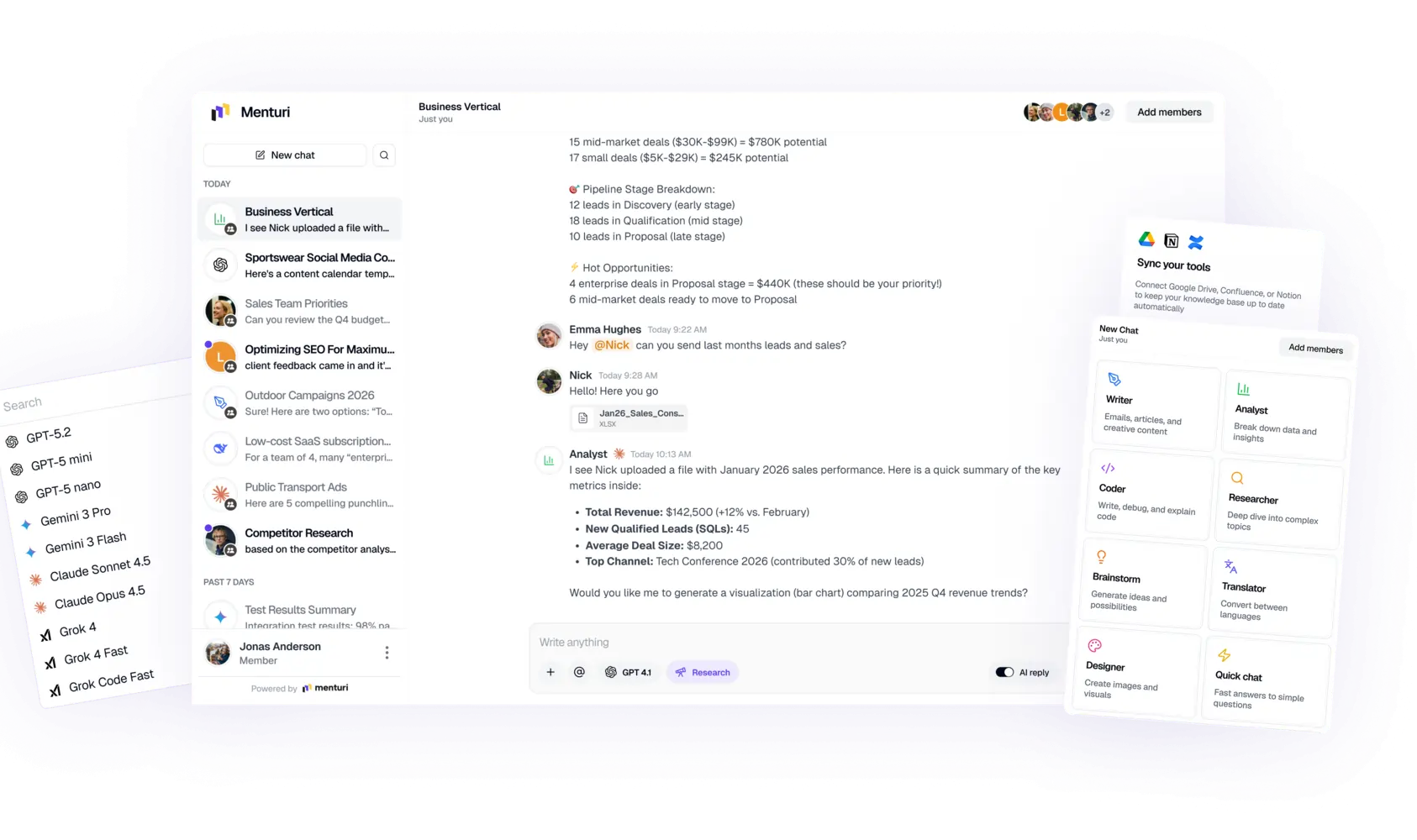
Menturi chat view
Writing a policy is step one. The harder part is keeping your approved tools, internal knowledge, and team usage in one place, so people don’t default to personal accounts or ad-hoc workflows.
Menturi is built for teams that want a single AI workspace with:
shared + private chats (collaboration like Slack/Teams)
knowledge base connections (Google Drive, Notion, Confluence)
usage and cost tracking (per employee + exports)
team controls like SSO and restricting expensive models
Ready to try it with your team?
Start a workspace, invite a teammate, and test Menturi on a real task (writing, analysis, or Deep Research) in minutes.
ChatGPT Enterprise Use Cases: 10 Ways Teams Are Using AI in 2026
Discover 10 practical ChatGPT Enterprise use cases for marketing, sales, HR, support, and ops. Learn how teams are using AI in 2026, plus pricing and alternatives.
How to Track AI Costs Across Your Team (2026)
Learn how to track and manage AI spending across your team. Covers cost tracking methods, budgeting strategies, and tools to prevent surprise bills from ChatGPT, Claude, and other AI services.
AI Knowledge Base Chatbot: What It Is + How to Build One for Your Team (2026)
Looking for an AI knowledge base chatbot for your team? Learn what these tools actually do, how to choose between Notion AI, ChatGPT Business, and other options, and what you need to set one up in 2026.
AI Acceptable Use Policy Template + Examples (2026)
A free AI Acceptable Use Policy (AUP) template for 2026, plus a simple rollout checklist to implement it fast and safely.



.png)
.png)
.png)